





















Customer effort score (CES) measures how much work a customer puts into completing a task. Yet many brands collect it only after support tickets close, leaving friction across the rest of the customer journey unmeasured.
A landing page that fails to match an ad, a complicated checkout, or an onboarding flow with unclear instructions can create effort long before someone contacts support.
The impact can be significant. Baymard Institute reports that 17% of surveyed US online shoppers abandoned an order because the checkout process was too long or complicated.
Measuring effort at these moments helps teams identify where customers struggle, connect survey responses with actual behavior, and prioritize improvements.
This guide explains how to calculate customer effort score, where to measure it across the journey, how to structure the survey, and how to turn the findings into actionable tasks with clear ownership.
Customer effort score (CES) measures how easy or difficult customers find completing a specific task or interaction. It captures the effort involved in the process, which can differ from satisfaction with the outcome.
CES typically uses one question immediately after an interaction.
For example: "To what extent do you agree that we made it easy to complete your task?"
Customers rate their agreement on a 1 to 7 scale, where 1 means strongly disagree and 7 means strongly agree. Higher scores indicate an easier experience.
The concept gained attention through a 2010 Harvard Business Review article, which examined the relationship between service effort and customer loyalty.
A customer might receive a refund or complete a purchase successfully but still struggle through the process. CES helps capture that difficulty.
The average CES calculation adds all survey responses and divides the total by the number of respondents.
Average CES=Sum of all ratings/Number of responses
Suppose five customers provide ratings of 6, 7, 4, 6 and 5 on a 1 to 7 agreement scale. The sum is 28, so the average effort score is 5.6.
Another method calculates the percentage of customers who select the highest ratings, such as 6 or 7 on a seven-point agreement scale.
Low-effort share (%) = (Number of ratings of 6 or 7 ÷ Total responses) × 100
Using the same example, three of the five respondents selected 6 or 7.
Example calculation:
Low-effort share = (3 ÷ 5) × 100 = 60%
This means 60% of respondents reported a low-effort experience.
The average shows the overall rating, while the top-two-box percentage shows how many customers reported a clearly easy experience.
CES measures perceived effort for a specific interaction. It cannot independently explain what caused the difficulty or predict overall brand satisfaction, loyalty or future purchases.
A low score identifies an interaction worth investigating. Teams can review customer comments, task completion rates, checkout abandonment or support records to understand what went wrong.
The backlog process covered later explains how to turn those findings into specific improvements with clear ownership.
Watch: What is Customer Effort Score? (CES Explained for Beginners)
Measure customer effort at every task your brand already pays to generate, starting before the support queue. Each survey moment below is tied to a customer task, a trigger event, a likely owner and the decision the reading should change.
| Touchpoint | Customer task | Trigger event | Likely owner | Decision it informs |
|---|---|---|---|---|
| Post-click landing page and lead capture | Find what the ad promised and leave details | Form submission or exit after a set dwell time | Media and creative leads | Whether the ad promise, the page or the form needs to change |
| Checkout and payment | Complete a purchase | Order confirmation page | Ecommerce or product owner | Which steps or fields to remove from the purchase flow |
| First use and account setup | Reach first value after signing up | Completion of setup or first key action | Product and onboarding owner | Where guidance, defaults or verification create drag |
| Support ticket resolution | Get an issue resolved | Ticket closed or conversation ended | Service operations lead | Policy, routing and knowledge changes in the queue |
| Channel switch and help center handoff | Move from self-service to a person without starting over | Escalation from help center, bot or form to a human channel | Service and digital owners jointly | Whether the handoff carries context or forces repetition |
The table is a template; owners and triggers will differ by organization. The decision column is the test of whether a touchpoint deserves a survey at all.
This is the earliest point where effort becomes measurable and the one most CES programs skip.
The customer's task is to find what the ad promised and act on it, so a high-effort reading here is the first evidence that the message and the page have drifted apart.
Most visitors already leave without acting: the median landing page converts 6.6% of visitors, based on more than 41,000 pages analyzed in Unbounce's 2024 Conversion Benchmark Report.
Trigger the question on form submission, and consider a lighter exit prompt for visitors who leave after engaging with the page.
The reading belongs to whoever owns the media plan and the creative, since the fix is usually a promise, a headline or a form.
A CES survey placed after checkout reveals where buyers hit friction in the purchase flow, and most flows carry far more of it than they need.
The average US checkout shows 23.48 form elements by default, while Baymard's checkout usability testing found an ideal flow needs only 12 to 14.

The task is clear, the trigger is the order confirmation page and the owner is whoever controls the checkout.
Field it carefully. A one-tap scale on the confirmation page, after the order details, keeps the final experience intact; a modal that interrupts the confirmation adds effort to a survey about effort.
Onboarding effort predicts whether a new customer reaches value at all. Trigger the question when setup completes or when the first meaningful action happens, and route the reading to the product or onboarding owner.
The decision it informs is specific: which defaults, verification steps or instructions make the customer work harder than the task requires.
Support resolution remains a useful CES touchpoint because customers can evaluate the work required to resolve a specific problem.
Trigger the survey after the ticket closes or the conversation ends. Ask about the complete resolution experience, including repeated contacts, unclear instructions and previous attempts to solve the issue.
A 2025 Gartner survey of 5,801 customers found that 60% of customer service agents failed to promote self-service options. This highlights another area service teams can examine when investigating how customers find and resolve issues.
Service operations should own improvements to routing, policies and knowledge resources. Problems originating in product or digital experiences should reach the teams responsible for those touchpoints.
When a customer moves from self-service to human support, the transition creates another opportunity for friction.
Research published in Harvard Business Review found that 81% of customers attempt to resolve matters themselves before contacting a live representative.
A Gartner survey of 1,492 B2B and B2C customers found that 62% of customer service channel transitions were high effort, which means the switch did not lead to resolution. When the transition was easy, 74% of customers said they would return to self-service next time.
Trigger the survey once the human channel resolves the issue, but ask about the entire journey, including the self-service attempt. Service and digital teams should jointly own the findings, since the fix may involve preserving information customers already provided.
Draft your own version of the table and identify the two touchpoints where friction poses the greatest commercial risk. Prioritize those for measurement.

Customer effort score measures the process, customer satisfaction (CSAT) measures the outcome and net promoter score (NPS) measures the relationship. They answer different questions at different moments, so the useful decision is which one to ask at which moment.
| Metric | What it measures | When to ask | Scale | Best decision it supports | Blind spot |
|---|---|---|---|---|---|
| CES | How easy one task was | Immediately after the task | 1 to 7 or 1 to 5 agreement | Which step, page or handoff to fix | Overall loyalty and the cause of effort |
| CSAT | Satisfaction with the outcome of an interaction | Immediately after the interaction | 1 to 5 satisfaction or binary | Whether the result met expectations | Hidden effort behind a good result |
| NPS | Likelihood to recommend the brand | On a relationship cadence, not tied to one task | 0 to 10 | Where the relationship stands over time | Which interaction moved the number |
CSAT captures how customers feel about the result, while CES captures how they felt about getting there.
Respondents don't always separate the two in their heads, so treat the table as design intent. It doesn't guarantee clean data.
A high CSAT is often read as safety. It isn't, when the customer rated the resolution and not the four attempts it took to reach it.
That is the churn you don't see coming: people who got what they asked for, said they were satisfied and decided quietly not to go through it again.
This is why effort earned its place as a metric. The 2010 Harvard Business Review research found customer effort score was a better predictor of loyalty than customer satisfaction measures or NPS.
CES and CSAT fire at the interaction, within minutes of the task ending, because memory of effort fades quickly. NPS runs on a relationship cadence, quarterly or at account milestones, because it asks about the brand rather than a moment.
Mixing the cadences damages both. An NPS question on an order confirmation page gets a transactional answer to a relationship question.
CES alone cannot measure brand loyalty; it predicts loyalty by locating friction and then stops. Mature programs run the three as complementary layers.
Audit your current survey program and mark which metric is asked at which moment. Remove duplicate asks, then fill the gap where effort goes unmeasured, which in most programs is everywhere before the support queue.

Write one agreement statement per instrumented touchpoint, use the same scale across all of them and cap how often any one customer is surveyed. Wording and scale are design choices made once; changing them later resets your baseline.
The current convention, often called CES 2.0, phrases the question as a statement to agree or disagree with rather than a rating of effort.
The standard wording is "The company made it easy for me to handle my issue," and it is generally recommended over earlier effort-rating phrasings.
The statement should name the task the customer just completed. A generic "handle my issue" on an order confirmation page confuses the respondent and blurs the reading.
| Touchpoint | Question wording | Scale | Delivery channel |
|---|---|---|---|
| Post-click landing page | "It was easy to find what I came here for" | 1 to 7 agreement | On-page prompt after form submission or exit |
| Checkout | "It was easy to complete my purchase" | 1 to 7 agreement | Order confirmation page, below order details |
| First use and setup | "It was easy to get set up and start using the product" | 1 to 7 agreement | In-app prompt after setup completes |
| Support resolution | "The company made it easy for me to handle my issue" | 1 to 7 agreement | Email or in-conversation after close |
| Channel switch | "It was easy to get help without repeating myself" | 1 to 7 agreement | Follow-up after the human channel resolves |
A 7-point scale gives more room to detect movement between periods, which matters when you're reading a trend on one touchpoint. A 5-point scale is faster to tap on a phone and easier to render inside a product.
The trade-off is sensitivity against completion. Choose based on where most responses will arrive, then apply that choice everywhere, because a 1 to 7 checkout score and a 1 to 5 onboarding score cannot sit on the same backlog.
Add one optional open question, shown only after the scale is answered: "What made it harder than it should have been?" The score tells you where; the text tells you what.
Keep it to one. A second or third question turns a two-second survey into a form, and completion drops in the segment you most need to hear from.
Deliver the question immediately after the task, while the effort is still a fresh memory. A delay of days converts an effort reading into a loyalty reading.
Set a maximum frequency per customer across all touchpoints, since a buyer who checks out, sets up an account and contacts support in one week shouldn't see three surveys.
Suppress repeat asks for a defined window and track the suppression rate, so you know how much of the journey went unmeasured.
A good customer effort score is one that is higher than your own baseline for the same task, measured the same way. Published thresholds exist, but they vary by publisher and scale, and no audited cross-industry dataset sits behind them.
Vendor guides place the line for a healthy score at different points on the 1 to 7 scale, and the figures rarely match.
Those published figures are unverified vendor judgment, useful as a sanity check and nothing more.
If you use the low-effort share method, the thresholds shift again, because a share and an average describe different things. Keep the two apart when comparing against anything external.
An external benchmark only means something when scale, wording and touchpoint match yours. A support-resolution average from a software company tells you nothing about your checkout, even on the same scale.
Most circulating benchmarks also don't disclose sample size, response rate or the period they cover. A number without those three facts can't be compared with anything, so treat it as background context at most.
A company-wide average is the least useful form of the metric. Hypothetically, a checkout average of 5.9 and an account-recovery average of 4.6 blend into 5.3, a number that hides the healthy flow and the broken one at once.
Segment in three passes:
Device alone can split a reading. In Unbounce's benchmark, 83% of landing page visits came from mobile devices, yet desktop converted 8% better.
Set a baseline per touchpoint over the first measurement period and define a minimum response count before any reading counts. Below that count, report the open text and hold the number.
Read the direction of movement over time, and attach each movement to a change you made or a change in traffic mix. The score works as a trend instrument.
To improve customer effort score, build a six-column backlog from your first reporting period and review it in a cross-functional meeting with named owners. The steps below assume readings exist and cover what to do with them.
Cut every reading until it points at a specific page, flow or queue rather than a department. "Checkout is high effort" is a complaint; "mobile checkout, guest path, address step" is a work item.
Stop at the minimum response count set for trend reading. A segment too small to read is still worth watching for open text.
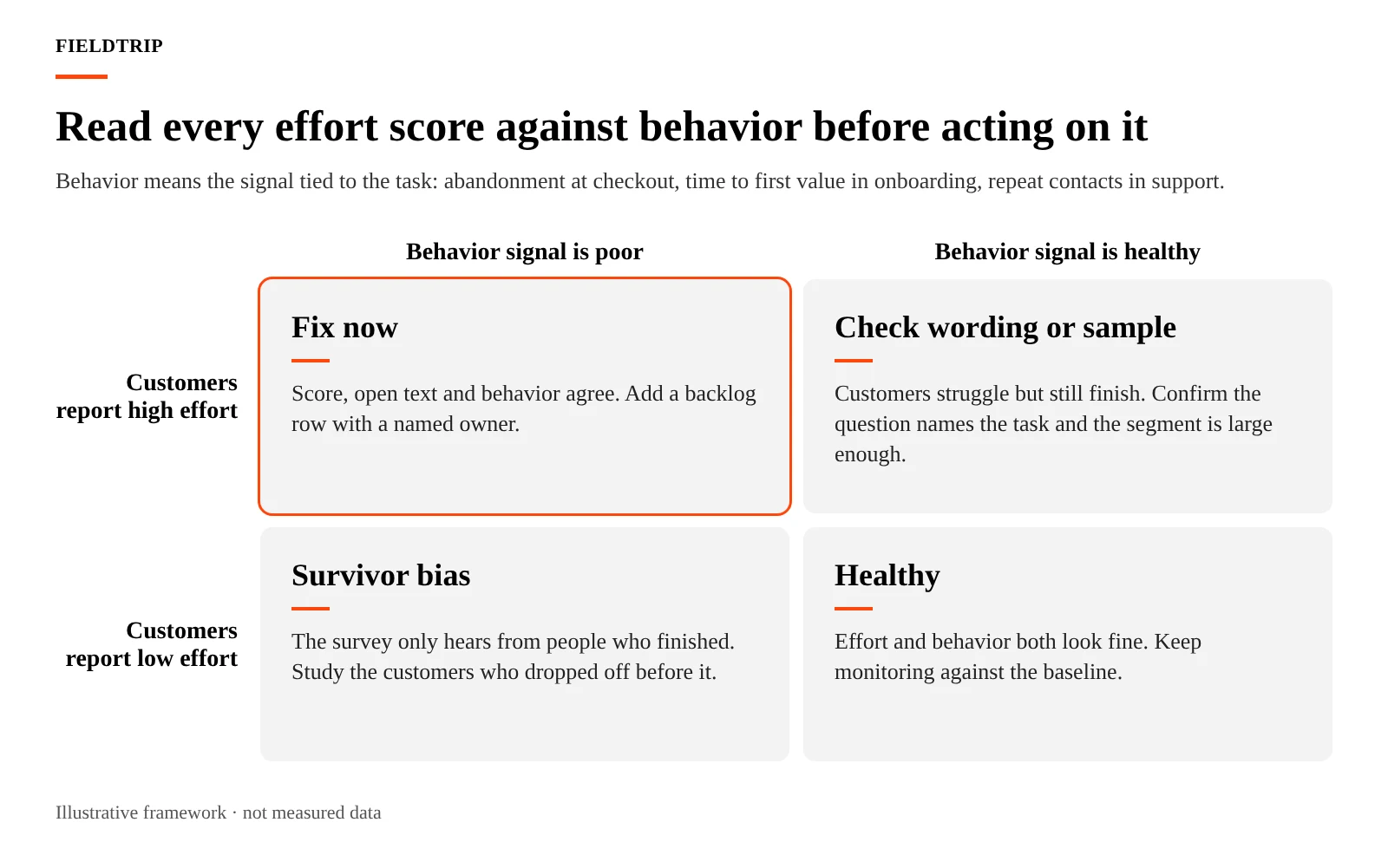
Read the open text for the lowest-scoring segment first and code it into a handful of causes. Then pull the behavioral signal that corresponds to the task: abandonment rate for checkout, time to first value for onboarding, repeat contacts for support.
A post-checkout effort survey locates where buyers hit friction; the abandonment data for that same step shows how many never reached the survey at all, which is what makes the two together more persuasive than either alone.
When the score, the text and the behavior point the same way, you have a candidate row.
Rank rows by three factors:
A severe score on a rare path can rank below a modest score on the path every buyer uses.
| Friction point | Effort score | Volume | Revenue or cost at risk | Owner | Next test |
|---|---|---|---|---|---|
| Mobile guest checkout, address step | 4.4 average | High, most mobile orders | Abandoned carts at this step | Ecommerce product owner | Autofill and fewer required fields |
| Paid search landing page, pricing promise | 4.8 average | High, all paid search traffic | Wasted media spend on bounced clicks | Media and creative leads | Align ad copy and page headline |
| Account recovery flow | 4.6 average | Low | Repeat contacts to support | Product and service jointly | Clearer verification instructions |
| Help center to chat handoff | 5.0 average | Medium | Agent handle time on repeated context | Service operations | Pass session context to agent |
Every figure in this table is hypothetical and illustrative. It shows the shape of the backlog, not measured results from any company.
Ownership follows the origin of the friction, not the team that received the survey. When the open text says the page didn't match the ad, the owner sits in creative and media, even if the reading came from a support ticket.
Name one owner per row and give them the authority to change the thing. The metric only moves when someone can act on it.
Remeasure the same touchpoint with the same question and scale after the fix ships, over a comparable period and traffic mix. Hold the row open until the retest reads, then record the before and after alongside the behavioral signal. Our creative testing and measurement guide covers how to structure the retest when the fix is a creative change.
If the score moves and the behavior doesn't, keep the row open. The survey may have measured the relief of a smaller group than the one you intended to help.
Customer effort scores become valuable when they change decisions about a page, a process, a message or a campaign. If the findings never lead to improvements, measurement becomes another reporting exercise.
CES works best alongside conversion data, customer behavior and media performance metrics. For example, high post-click effort combined with healthy support scores can point to friction in landing pages, forms or the broader acquisition experience.
At Fieldtrip, we connect measurement and attribution with media and creative decisions, helping teams identify problems, assign ownership and test improvements.
Our specialist teams can work alongside your existing marketing and product teams, starting with a specific friction point rather than an entirely new measurement program.
Contact us to identify where customer effort is hurting conversions and turn those findings into measurable improvements.
No, not on its own. A high CSAT describes the outcome, and customers who got what they asked for will often report satisfaction even after a draining process. Read the two together; a satisfied segment with a low effort score is where quiet churn tends to live.
There is no fixed minimum for every customer effort score survey. The required sample depends on response variability, the precision you need and the size of the change you want to detect. Smaller samples produce less precise estimates.
Yes, but survey delivery can influence responses. Customers answering an agent directly may respond differently from those completing an anonymous online survey. Use consistent questions and scales, and account for survey mode before comparing results.
A standard CES average cannot be negative when responses use a 1 to 5 or 1 to 7 scale. Negative values may appear in custom reporting systems that subtract unfavorable responses, but those results use a different scoring method.
Divide the number of completed CES surveys by the number of eligible customers invited, then multiply by 100. For example, 80 completed surveys from 400 invitations produce a 20% response rate.
Customer effort score measures perceived difficulty during a specific task. A customer experience score typically combines several dimensions, such as satisfaction, ease and emotional response, to assess a broader experience. The exact calculation depends on the organization's framework.
Yes. Anonymous CES surveys can encourage candid feedback, particularly after sensitive service interactions. However, anonymity limits the ability to connect individual responses with customer records or follow up directly. Teams should clearly explain how responses will be used.